Banyak UMKM di Indonesia yang takut bikin website karena keraguan harus bisa coding, harus hire programmer, atau harus belajar teknis yang rumit. Akibatnya, mereka akhirnya tidak jadi punya website — padahal website adalah investasi wajib untuk bersaing di era digital 2026
Padahal, sekarang kamu bisa bikin website profesional dalam 5 menit tanpa menyentuh satu baris kode pun. Cukup pakai Auto Installer WordPress & WooCommerce dari hosting provider seperti Gapurahoster — klik beberapa kali, dan website kamu langsung online, siap terima customer .
Dalam artikel ini, kamu akan mengetahui:
Apa itu Auto Installer dan kenapa menghemat waktu 10 jam+
Cara bikin website WordPress/WooCommerce dalam 5 menit (step-by-step)
Kenapa Auto Installer lebih aman daripada instalasi manual
Gapurahoster sebagai hosting dengan Auto Installer tercepat & termudah di Indonesia
Apa Itu Auto Installer?
Auto Installer adalah fitur di hosting yang memungkinkan kamu instal CMS (Content Management System) seperti WordPress, WooCommerce, Joomla, atau Drupal hanya dengan 1 klik — tanpa perlu:
Upload file FTP
Buat database manual
Edit file konfigurasi
Setup PHP/MySQL
Know coding sama sekali
Gapurahoster menyediakan Auto Installer untuk 100+ CMS termasuk WordPress, WooCommerce, Shopify Lite, Moodle, dan banyak lainnya — semua tinggal klik, langsung aktif .
Cara Bikin Website WordPress dalam 5 Menit (Step-by-Step)
Berikut cara praktis bikin website WordPress/WooCommerce dengan Auto Installer di Gapurahoster:
Step 1: Login ke Control Panel
Buka email konfirmasi dari Gapurahoster
Klik link DirectAdmin/cPanel yang disediakan
Login dengan username & password yang dikirim
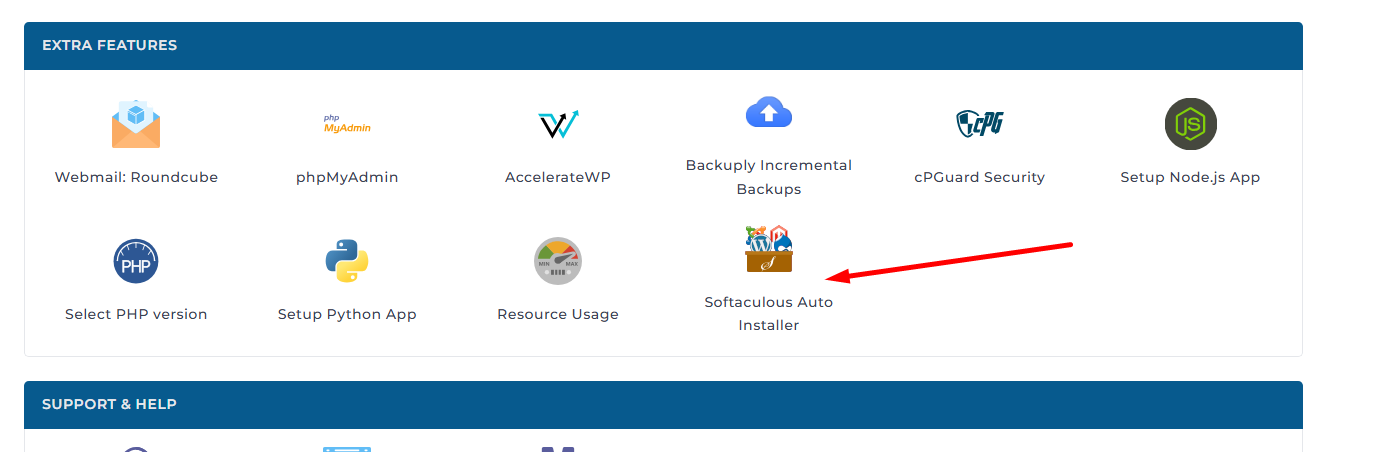
Step 2: Cari Auto Installer
Di dashboard DirectAdmin/cPanel, cari bagian “Software” atau “Applications”

Klik “Auto Installer” atau “Softaculous”
Step 3: Pilih WordPress atau WooCommerce
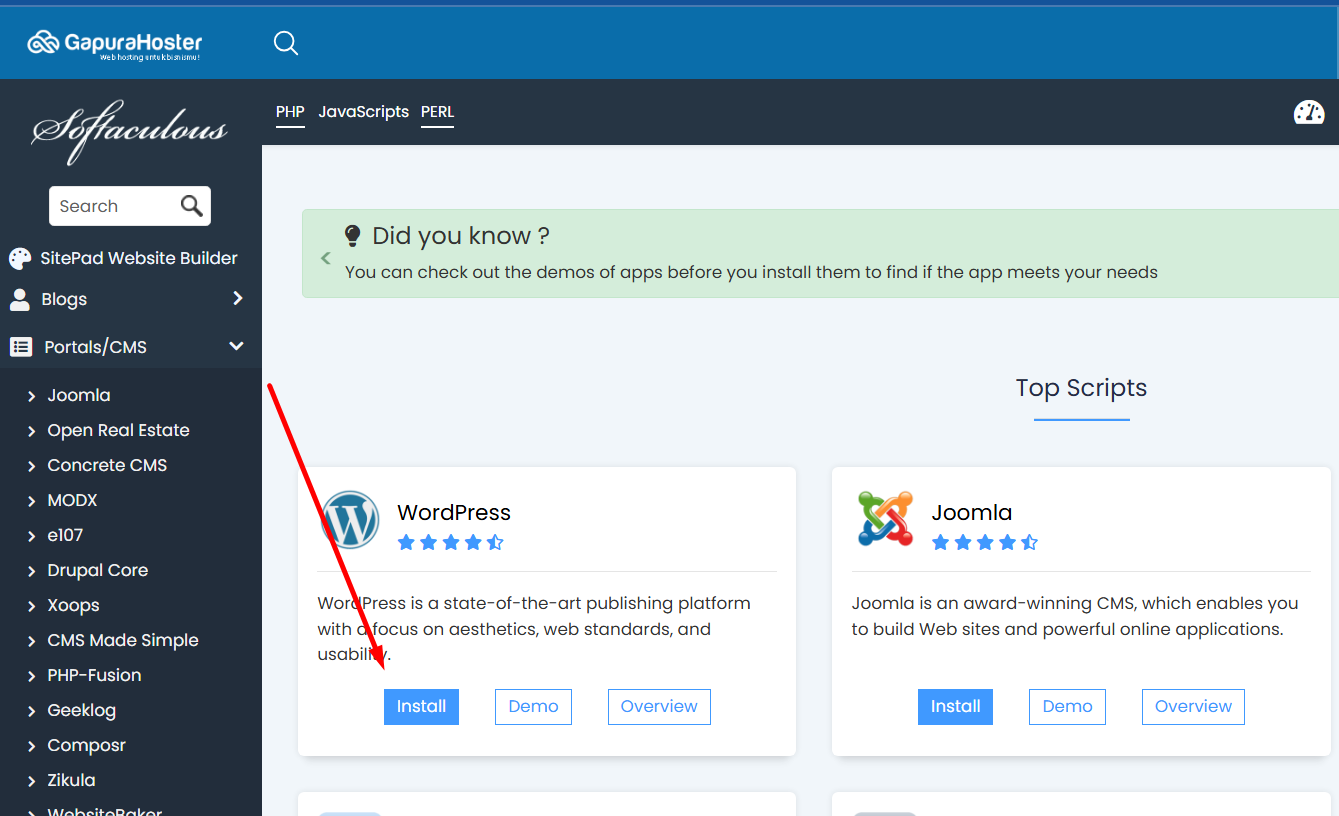
Di Auto Installer, pilih “WordPress” untuk blog/company profile

Pilih “WooCommerce” untuk toko online (sudah ada WordPress + plugin toko)
Klik “Install Now”
Step 4: Isi Data Website (2 Menit)
Isi formulir yang muncul:
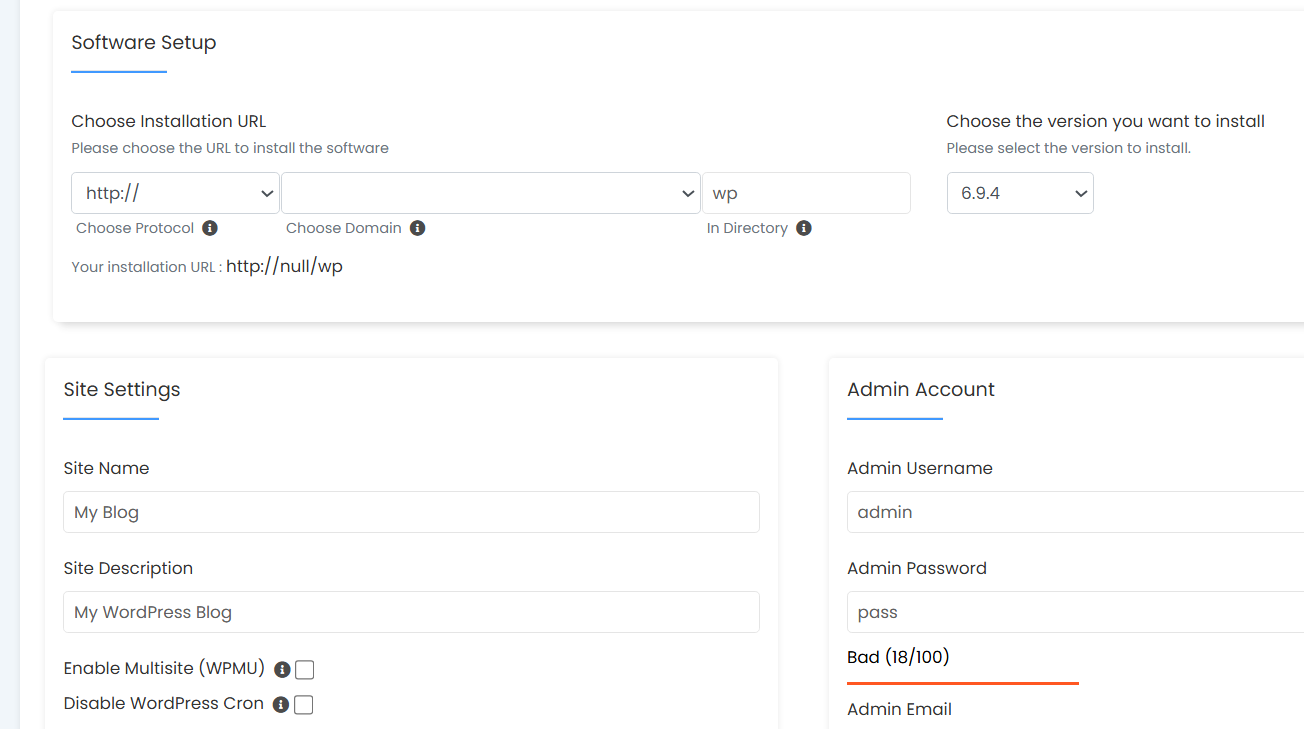
Domain: Pilih domain kamu (misal: tokomu.id)
Site Name: Nama website (misal: “Toko Mama Solo”)
Admin Username: Username login (jangan pakai “admin”)
Admin Password: Password kuat (minimal 12 karakter)
Admin Email: Email aktif untuk notifikasi
Klik “Install” → selesai!
Step 5: Website Langsung Online!
Dalam 30–60 detik, WordPress/WooCommerce kamu sudah siap:
Akses dashboard:
tokomu.id/wp-adminLogin dengan username & password yang baru dibuat
Mulai kamu: tambah produk, tulis artikel, atau desain halaman
Total waktu: 5 menit dari login → website live, tanpa coding sama sekali .
Kenapa Auto Installer Lebih Aman daripada Instalasi Manual?
1. 0% Risiko Error Database
Instalasi manual sering bermasalah:
Database tidak tercreate → website error
Prefix tabel salah → plugin tidak jalan
File konfigurasi salah →.white screen of death
Auto Installer otomatis create database, user, dan konfigurasi → 0% error .
2. Update Otomatis & Keamanan Terjamin
Dengan Auto Installer:
WordPress/WooCommerce otomatis update ke versi terbaru
Plugin & theme dijamin compatible dengan versi terbaru
Security patch otomatis — tidak perlu update manual
Tanpa Auto Installer:
Kamu harus ingat sendiri update (sering terlupa)
Website rentan diretas karena versi lama
Plugin conflict → website down
3. Backup & Restore dalam 1 Klik
Auto Installer di Gapurahoster punya fitur:
Auto backup harian → tidak hilang jika ada masalah
Restore 1 klik → kembali ke versi sebelumnya dalam 30 detik
Staging environment → test perubahan sebelum live
4. Tanpa Skill Teknis = Cocok untuk UMKM
UMKM di Solo/Surakarta yang tidak punya tim IT bisa langsung:
Bikin 1 website company profile → 5 menit
Bikin toko online → 8 menit (WordPress + WooCommerce)
Bikin blog → 5 menit
Semua tanpa hire programmer, tanpa kursus coding, tanpa baca manual panjang [user-memory].
Siapa yang Wajib Pakai Auto Installer?
Jika kamu pernah lihat tutorial WordPress yang panjang 20 halaman → Auto Installer adalah solusi 10x lebih cepat .
Gapurahoster: Auto Installer Tercepat & Termudah di Indonesia
Gapurahoster menyediakan Auto Installer untuk 100+ CMS dengan kecepatan instalasi tercepat di Indonesia — semua paket hosting sudah termasuk fitur ini gratis .
Paket Hosting dengan Auto Installer Gratis
Fitur semua paket:
Auto Installer 100+ CMS (WordPress, WooCommerce, Joomla, Drupal, etc.)
Instalasi dalam 5 menit tanpa coding
NVMe SSD 10x lebih cepat
SSL gratis selamanya
Harga perpanjangan tetap
Support 24/7 Bahasa Indonesia
Migrasi gratis
Apa yang Bisa Dibuat dengan Auto Installer?
Total: 100+ pilihan, semua gratis, semua dalam 5–10 menit .
Kesimpulan: Auto Installer = Website Live dalam 5 Menit, Tanpa Coding
Auto Installer WordPress & WooCommerce adalah solusi wajib untuk UMKM Indonesia yang ingin:
⚡ Website live dalam 5 menit — tidak perlu tunggu programmer
💰 Hemat Rp 500rb–2jt — tidak perlu hire developer
🔒 0% error, 100% aman — auto update + backup otomatis
🇮🇩 Cocok untuk UMKM yang tidak bisa coding — klik 3x, langsung jadi
Gapurahoster adalah hosting dengan Auto Installer tercepat, termudah, & gratis untuk semua paket — mulai Rp 8.300/bulan, dengan NVMe SSD, SSL gratis, harga tetap, dan support 24/7 Bahasa Indonesia .
Butuh bantuan instalasi? Tim support Gapurahoster siap bantu aut instalasi WordPress/WooCommerce secara gratis — cukup chat via WhatsApp atau live chat, dalam Bahasa Indonesia .